Cold-Email Infrastructure Control Plane

Fleets get burned by what they share.

Shared IPs. Shared tenants. Shared nameservers. Leaked redirect hops. Filters cluster sending fleets by their common infrastructure — wharf is domain infrastructure built to share none of it.

Start on wharf Self-serve · No sales call

Free, public DNS only — no login, no email. Click a surface for the raw records.

$ dig NS roaiadvisory.com  # our own fleet, domain #1 — live
ns-1371.awsdns-43.org
ns-648.awsdns-17.net
ns-54.awsdns-06.com
ns-2028.awsdns-61.co.uk
DKIM verified · MAIL FROM aligned · mailboxes warming

Four nameservers, four pilings — the fourth one isolates.

Scroll — watch the fourth piling isolate
1 : 1
Zone Per Domain (Route 53)
0 Hops
Zero-Redirect Edge Masking
0 Passwords
Mailbox Passwords Stored
100%
Locked AutoRenew Enforced

The four shared surfaces

Every provider isolates at most two of these. Wharf removes all four.

When you cluster multiple domains on shared hosting or standard registrars, a single domain burn contaminates the entire fleet.

nameservers

One isolated NS set per domain

Every domain receives its own isolated Route 53 zone with a distinct four-nameserver delegation set. Your domains never share a DNS fingerprint with each other or anyone else's fleet.

IPs & tenants

We never send your mail

Connect your own Google Workspace mailboxes via OAuth. Wharf never stores a mailbox password.

redirect targets

Masking with no redirect

Custom tracking hostnames serve your destination in place at the edge with HTTP 200 responses — zero 3xx redirect hops exposed to spam filters.

lapsed domains

Auto-renew, enforced daily

Auto-renew is forced on at registration and verified daily by an automated watchdog cron. You are the legal ICANN registrant — transfer out whenever you like.

Engineered for your workflow

Purpose-built for operators managing scale & founders guarding brand equity.

Select your operating profile to see how Wharf isolates risk and simplifies your sending architecture.

Zero cross-domain blast radius at scale

When you run 10 to 150+ outreach domains for clients, one burned inbox should never take down your agency fleet. Wharf isolates every single zone at the nameserver root.

  • 1 Route 53 delegation set per domain — zero shared footprints
  • Automated warmup score sync with Instantly
  • Provision a batch of domains in one request
  • Automated DMARC aggregate report parsing
# Agency Fleet Summary
• Total Domains Managed: 40
• Unique NS Zones: 40 / 40 (100% Isolated)
• DMARC Alignment: Strict p=quarantine
• Mailbox State: 120 connected · warming
• Blast Radius: 0% Cross-Domain Contamination

Bulletproof secondary domains in minutes

Protect your primary company domain by running all outbound campaigns on dedicated, isolated secondary hostnames configured to enterprise RFC standards.

  • Protect your core brand from spam list blacklists
  • Bring your own Google Workspace accounts via OAuth
  • Never store passwords or refresh tokens in third-party tools
  • Forced auto-renew ensures your domain never lapses
# In-House Outbound Setup
• Primary Root: yourbrand.com (Untouched)
• Sending Domains: getyourbrand.com, useyourbrand.com
• Edge Masking: link.getyourbrand.com (HTTP 200)
• SPF & DKIM: Automated 10/10 Deliverability Check
• Setup Time: < 5 minutes to launch

Infrastructure topology

Shared clustered stack vs. Wharf isolated fleet.

Why outreach fleets die: shared DNS footprints allow spam filters to cluster and burn multiple sending domains at once.
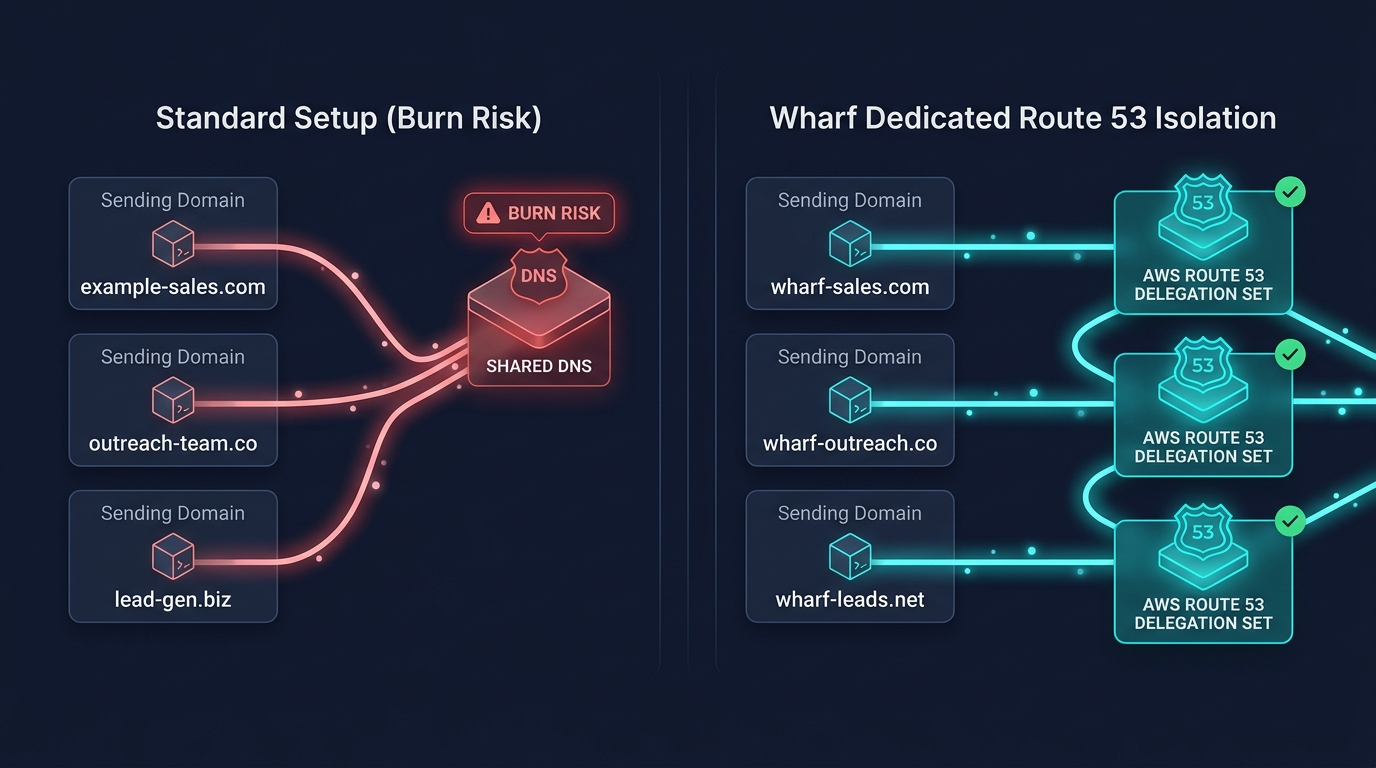
Wharf Dedicated Route 53 Isolation Topology
❌ Standard Clustered Setup (Fleet Death)
Shared Nameserver PairsEvery domain shares the same registrar nameserver pair. 1 burned domain flags all 10.
302 Redirect LeaksTracking CNAMEs redirect through shared proxy pools, leaking the redirect hop.
SPF PermErrors & Missing DMARC>10 lookup limits overflow silently; no aggregate rua reporting to catch spoofing.
Forgotten ExpirationsRegistrations lapse at year-end, wiping out months of domain warmup reputation.
✓ Wharf Isolation Engine (Resilient)
Dedicated Delegation Sets1 domain = 1 distinct Route 53 zone. Zero cross-domain nameserver correlation.
Edge Reverse-Proxying (HTTP 200)Content served directly under your custom tracking subdomain with zero redirects.
Automated DNS ComplianceSPF mechanism limits strictly verified; DMARC reports monitored continuously.
Locked AutoRenew + Daily WatchdogsAutoRenew hardcoded to true; daily background jobs guard against DNS drift.

Programmatic & Agentic Control

Operate via Console, CLI, or Autonomous AI Agents.

Wharf is programmable from day one. Human operators use the modern console or CLI, while AI SDR agents connect via native Model Context Protocol (MCP).

# 1. Inspect fleet health & deliverability via Wharf CLI
$ wharf domains list --json
$ wharf audit outreach-01.com outreach-02.com

# 2. Connect Claude Desktop / Cursor / Autonomous SDR Agents via MCP Server
$ wharf mcp
✓ JSON-RPC 2.0 Stdio MCP Server active (wharf_list_domains, wharf_check_availability, wharf_audit_deliverability)

How it works

Requested → isolated, masked, authenticated, connected.

One durable pipeline drives every domain through the same auditable steps in real time.

Acquire & isolate

Register (or import) the domain into its own Route 53 zone with a distinct delegation set. Auto-renew on, transfer-lock on.

Mask

Masked link hostnames serve your real site under the sending domain — no redirect, valid cert, done for you.

Authenticate

SPF, DKIM, DMARC and a verified SES identity, written record-by-record. DMARC tightens only on report evidence.

Connect

Connect your Workspace mailbox with one OAuth consent, hand it to your sequencer, enroll warmup.

Verifiable receipts

Receipts, not buzzwords. Every claim has a falsifier.

Here is the exact command you can run to test every technical mechanism Wharf provides.

Every domain answers from a dedicated Route 53 delegation set — zero shared DNS fingerprints.

$ dig NS yourdomain.com +short — four distinct awsdns hostnames unique to your zone

Masked tracking subdomains mirror your target site at the edge with zero 3xx redirects.

$ curl -I https://track.yourdomain.com — returns HTTP/2 200 OK with origin headers scrubbed

You own the domain, not us — you are the registrant.

$ whois yourdomain.com — registrant contact reflects your verified organization details

Wharf holds zero mailbox passwords or OAuth refresh tokens at rest.

You connect Workspace with one OAuth consent — there is no password field to fill

Auto-renew is permanently locked to prevent fleet expiration death.

GetDomainDetail confirms AutoRenew: true locked at registrar

SPF mechanisms stay strictly within the RFC 10-lookup budget.

$ dig TXT yourdomain.com — single clean v=spf1 record with zero PermErrors

Pricing

Pay for domain infrastructure. Keep your mailboxes anywhere.

Per-domain pricing — not per-mailbox rent. Domains are billed at registrar cost (~$12–15/yr), never marked up. Cancel from your billing portal whenever you like.

Starter
$49/mo
up to 10 domains · $4.90/domain
  • Isolated nameserver set per domain
  • No-redirect masked hostnames
  • SPF · DKIM · DMARC + SES identity
  • Evidence-gated DMARC ladder
  • Daily auto-renew watchdog
Growth
$149/mo
up to 40 domains · $3.73/domain
  • Everything in Starter
  • Instantly warmup score sync
  • Automated DMARC aggregate monitoring
  • Priority support
Scale
$399/mo
up to 150 domains · $2.66/domain
  • Everything in Growth
  • White-glove onboarding
  • Fleet migration from your current setup

Infrastructure Feature Starter ($49/mo) Growth ($149/mo) Scale ($399/mo)
Domain Capacity Up to 10 domains Up to 40 domains Up to 150 domains
Dedicated Route 53 NS Isolation (4 NS/zone) ✓ ✓ ✓
Edge Reverse-Proxy Masking (HTTP 200 In-Place) ✓ ✓ ✓
Automated SPF, DKIM, DMARC + SES Setup ✓ ✓ ✓
Evidence-Gated DMARC Tightening Ladder ✓ ✓ ✓
Locked AutoRenew + Daily Drift Watchdog ✓ ✓ ✓
Google Workspace OAuth Connection ✓ ✓ ✓
Instantly Warmup Score Sync — ✓ ✓
DMARC Aggregate Reporting (rua Ingest) — ✓ ✓
White-Glove Fleet Migration Service — — ✓
Dedicated SLA & Architecture Support Standard Priority 1-on-1 Dedicated

Billed by Emerge Digital IT Solutions LLC via Stripe. Subscriptions include a 14-day money-back policy on the first billing cycle. Domain registration fees are billed at exact pass-through registrar cost and are non-refundable once registered. Terms · Privacy

Frequently answered questions

Everything you need to know about Wharf infrastructure.

Direct answers to technical questions from operators and engineering teams.

Major email service providers and spam filtering engines correlate domain networks not just by IP and DKIM selectors, but by registrar nameserver fingerprints. When 20 domains share the exact same nameserver pair, burning one domain flags the entire cluster. Wharf creates a dedicated Route 53 zone for every single domain, each with a randomized 4-nameserver delegation set.
Security and deliverability isolation. You connect mailboxes using Google OAuth consent. Wharf never asks for, receives, or persists mailbox passwords in plaintext or ciphertext.
Traditional tracking links issue an HTTP 301 or 302 redirect hopping to the real company website. Spam filters follow these redirects and identify the parent organization. Wharf deploys a reverse-proxy edge worker that fetches and serves your real destination site directly in place under your custom subdomain with clean HTTP 200 responses, scrubbing backend correlation headers.
Yes. You can import existing externally registered domains by delegating their nameservers to the dedicated Route 53 delegation set Wharf provisions for you. Wharf will immediately manage SPF, DKIM, DMARC, edge masking, and mailbox connectivity while you retain domain ownership at your current registrar.
Setting a DMARC policy to p=reject prematurely can cause legitimate emails to be dropped if any DNS alignment is incomplete. Wharf starts every new domain at p=none with rua aggregate reporting enabled. As DMARC aggregate reports prove 100% SPF/DKIM alignment over time, the policy advances safely to p=quarantine and p=reject based on hard cryptographic evidence.
You own your domains. If you ever cancel your Wharf subscription, your domains remain registered in your name. You can unlock and transfer them to any registrar at any time with zero lock-in or transfer penalties.

Not ready today

Still burning domains? Start above. Still deciding? Leave your email.

No drip sequence and no sales call — we write when there is something worth reading about keeping a sending fleet alive.